Mergify Conditions
Everything you need to know when writing conditions in Mergify
A condition is a boolean expression evaluated against a pull request’s attributes to determine whether a rule applies.
Structure of a Condition
Section titled Structure of a ConditionThe grammar for a condition is:
[ "-" ] [ "#" ] <attribute> [ <operator> <value> ]
Modifiers
Section titled Modifiers-
The optional minus (
-) prefix negates the condition (“not”). Time-based attributes (timestamps,schedule, andcurrent-datetime) cannot be negated this way. -
The optional hash (
#) prefix evaluates the length of an attribute (for example, the number of items in a list). Thecommits-behindattribute is only available in this counted form and always requires the#prefix.
Attributes
Section titled AttributesAttributes represent properties of a pull request: number of approvals, labels, status of CI checks, and so on.
The scope attribute holds the list of scopes associated
with the pull request, so you can match conditions against them.
Operators
Section titled OperatorsWhen the attribute is a list, comparison operators behave as if “any” is used on the list: the condition is true if any element matches.
# True if any check named `test` succeeds.- check-success = test# True if any modified file starts with foo/- files ~= ^foo/Values
Section titled ValuesValues can be strings, numbers, or Booleans, depending on the attribute.
For example:
#approved-reviews-by >= 2
- Attribute:
approved-reviews-by(list of approved reviewers). - Operator:
>=. - Value:
2. - The
#prefix evaluates the length of the list.
Boolean attributes are used on their own or negated with -:
# True if the PR is merged- merged# True if the PR is open- -closedMatching the Pull Request Author
Section titled Matching the Pull Request AuthorUse {{ author }} as a value to match an attribute against the pull request’s
author. It’s resolved as a native, built-in value and is accepted everywhere a
value can appear, so existing configurations keep working unchanged.
# True if the event sender is the pull request author- sender = {{ author }}# True if a commit is authored by the pull request author- commits[*].author = {{ author }}Attributes List
Section titled Attributes ListConditions are evaluated against the following pull request attributes, split into Mergify attributes and a read-only set loaded from GitHub.
Mergify Attributes
Section titled Mergify Attributesadded-files#The files that are added by the pull request.
added-lines#The lines that are added by the pull request. Only usable as #added-lines for the number of added lines.
approved-reviews-by#The list of GitHub user or team login that approved the pull request. Team logins are prefixed with the @ character and must belong to the repository organization. This only matches reviewers with admin, write or maintain permission on the repository.
assignee#The list of GitHub user or team login that are assigned to the pull request. Team logins are prefixed with the @ character and must belong to the repository organization.
base#The name of the branch the pull request should be pulled into.
body#The content of the pull request description without Markdown/HTML comments.
body-raw#The content of the pull request description.
changes-requested-reviews-by#The list of GitHub user or team login that have requested changes in a review for the pull request.
check-cancelled#The list of checks that were cancelled for the pull request. Cancelled checks are also matched by check-failure; use check-cancelled to address them independently.
check-failure#The list of checks that failed for the pull request. Checks that report being cancelled, timed out, and action required are also considered as failures.
check-neutral#The list of checks that are neutral for the pull request.
check-pending#The list of checks that are pending for the pull request.
check-skipped#The list of checks that was skipped for the pull request.
check-stale#The list of checks that are stale for the pull request.
check-success#The list of checks that successfully passed for the pull request.
check-timed-out#The list of checks that timed out for the pull request.
closed#Whether the pull request is closed.
closed-at#The time the pull request was closed at.
commented-reviews-by#The list of GitHub user that have commented in a review for the pull request. This only matches reviewers with admin, write or maintain permission on the repository.
commits#The list of commits of the pull request. The index 0 is the first commit, while -1 is the last commit.
commits-behind#The list of commits between the head of the base branch and the base of the pull request. This can only be used with the length operator as #commits-behind.
commits-unverified#The list of commit messages that are marked as unverified by GitHub.
conflict#Whether the pull request is conflicting with its base branch.
created-at#The time the pull request was created at.
current-datetime#The current date and time.
deleted-lines#The lines that are deleted by the pull request. Only usable as #deleted-lines for the number of deleted lines.
dependabot-dependency-name#The dependency-name value included in the Dependabot commit message.
dependabot-dependency-type#The dependency-type value included in the Dependabot commit message.
dependabot-update-type#The update-type value included in the Dependabot commit message.
depends-on#The list of dependencies to other pull request in the format owner/repo#prnumber.
deployment-failure#The list of deployments that failed for the pull request.
deployment-success#The list of deployments that successfully passed for the pull request.
dismissed-reviews-by#The list of GitHub user login that have their review dismissed in the pull request.
draft#Whether the pull request is in draft state.
files#The files that are modified, deleted or added by the pull request.
head#The name of the branch where the pull request changes are implemented.
head-repo-full-name#The head branch repository full name (complete version with the organization name).
label#The list of labels of the pull request.
linear-history#Whether the pull request commits history is linear (no merge commit).
locked#Whether the pull request is locked.
merge-commit-sha#The merge commit SHA of the pull request returned by GitHub.
merged#Whether the pull request is merged.
merged-at#The time the pull request was merged at.
merged-by#The GitHub user that merged the pull request.
mergify-configuration-changed#Whether the pull request contains changes in the configuration file.
milestone#The milestone title associated to the pull request.
modified-files#The files that are modified by the pull request.
modified-lines#The lines that are modified by the pull request. Only usable as #modified-lines for the number of modified lines.
number#The pull request number.
queue-dequeue-reason#The code identifying why a pull request's merge queue checks ended — the pull request may have left the queue, or had its checks interrupted while staying in the queue.
queue-merge-started-at#The time the pull request mergeability checks have started at.
queue-name#The name of the queue containing the pull request.
queue-position#The position of the pull request in its queue if queued. The first pull request in the queue has position 0. The value is set to -1 if the pull request is not queued.
queued-at#The time the pull request was queued at for merge.
removed-files#The files that are removed by the pull request.
repository-full-name#The current repository full name (complete version with the organization name).
repository-name#The current repository name (short version without the organization name).
review-requested#The list of GitHub user or team login that were requested to review the pull request. Team logins are prefixed with the @ character. This only matches reviewers with admin, write or maintain permission on the repository.
review-threads-resolved#The list of ids associated to review threads that are marked as resolved by GitHub.
review-threads-unresolved#The list of ids associated to review threads that are NOT marked as resolved by GitHub.
schedule#The current time will be compared against this schedule to validate this attribute.
scope#The list of scopes associated with the pull request for merge queue batching.
sender#The GitHub login of the command author.
sender-permission#The permission of the command author.
title#The title of the pull request.
updated-at#The time the pull request was updated at.
updates#The list of updates done on an opened pull request.
GitHub Rulesets and Branch Protection Attributes
Section titled GitHub Rulesets and Branch Protection AttributesMergify loads these attributes from the GitHub rulesets and branch protection rules active on the pull request’s base branch. They are read-only: Mergify populates their values from GitHub, so you cannot set them in your configuration. Use them in conditions to gate on the same review and protection requirements that GitHub enforces.
github-code-owner-review-satisfied#Whether every file the pull request touches that is owned in the repository's CODEOWNERS file has at least one approval from one of its owners (a user, or any member of an owning team). Mirrors GitHub's 'Require review from Code Owners', covering the case where GitHub blocks the merge on a code-owner review while pullRequest.reviewDecision is null. Returns true when there is no CODEOWNERS file or no touched file is owned, and false when an owner cannot be resolved to a GitHub login (an email address, or a team in another org).
github-require-last-push-approval#Whether GitHub's 'Require approval of the most recent reviewable push' is satisfied: the required number of approvals are in from reviewers other than the user who pushed the most recent commit, and approvals submitted against an earlier head no longer count. Mirrors how GitHub's pullRequest.reviewDecision evaluates the require_last_push_approval branch protection / ruleset option. Returns true when no rule on the base branch requires last-push approval, and (leniently) when Mergify has not recorded the most recent push, such as pull requests opened before push tracking.
github-require-review-from-specific-teams#Whether every required_reviewers entry on the branch's active GitHub rulesets is satisfied (each named team has the requested number of approvals, each named user has approved). When the rule scopes the requirement to a subset of files via file_patterns, the check only applies to PRs that touch a matching file. Returns false if an entry references a team or user id that cannot be resolved.
github-review-approved#Whether GitHub's effective review enforcement is satisfied: the required approvals are in and no eligible reviewer is blocking with an active 'Request changes'. When the rule requires at least one approval, this mirrors GitHub's pullRequest.reviewDecision (so a blocking review from a reviewer other than the approver is honored, unlike a bare approval count). When the rule requires a pull request with no approval count, it blocks only on a write+ reviewer's active 'Request changes'. Returns true when no rule on the base branch requires a review.
github-review-decision#The review decision computed by GitHub from its pullRequest.reviewDecision field, driven by either classic branch protection or repository / organization rulesets. Typically reflects whether required approvals and CODEOWNERS reviews have been satisfied.
Operators List
Section titled Operators List| Operator Name | Symbols | Description |
|---|---|---|
| Equal |
| This operator checks for strict equality. If the target attribute type is a list, each element of the list is compared against the value and the condition is true if any value matches. |
| Not Equal |
| This operator checks for non equality. If the target attribute type is a list, each element of the list is compared against the value and the condition is true if no value matches. |
| Match |
| This operator checks for regular expressions matching. If the target attribute type is a list, each element of the list is matched against the value and the condition is true if any value matches. |
| Glob |
| This operator checks for matching path using Unix-style pathname pattern expansion. If the target attribute type is a list, each element of the list is matched against the value and the condition is true if any value matches. |
| Greater Than or Equal |
| This operator checks for the value to be greater than or equal to the
provided value. It’s usually used to compare against the length of a
list using the # prefix. |
| Greater Than |
| This operator checks for the value to be greater than the provided
value. It’s usually used to compare against the length of a list using
the # prefix. |
| Lesser Than or Equal |
| This operator checks for the value to be lesser then or equal to the
provided value. It’s usually used to compare against the length of a
list using the # prefix. |
| Lesser Than |
| This operator checks for the value to be lesser than the provided value. It’s
usually used to compare against the length of a list using the |
Operators on Lists
Section titled Operators on ListsMost operators iterate over list attributes and return true if any value matches.
For a pull request with labels (bug, work-in-progress):
label = work-in-progressis true.label = enhancementis false.label != work-in-progressis false.label ~= ^workis true.-label ~= ^workis false (negated with-).
Examples with Operators
Section titled Examples with Operators# Match a specific milestone- milestone = v1.0
# Fewer than 50 files changed- "#files <= 50"
# Label is not "bug"- label != bugQualifying Checks by GitHub App
Section titled Qualifying Checks by GitHub AppTwo GitHub Apps can publish a check with the same name (for example, both a
GitHub Actions workflow and a third-party CI emit a pep8 check). The bare
form is ambiguous in that case: check-success = pep8 matches whichever app
reported success.
To disambiguate, prefix the check name with @<github-app-slug>/:
@<github-app-slug>/<check-name>
-
The leading
@is the opt-in marker; without it, the check name is matched literally as before. -
<github-app-slug>is the GitHub App slug as it appears in the check’s URL on GitHub (e.g.github-actions,semantic-pull-request). -
<check-name>is the check name exactly as GitHub reports it.
The qualified form is supported on every check-* attribute that takes a
check name: check-success, check-success-or-neutral, check-failure,
check-neutral, check-skipped, check-timed-out, check-pending, and
check-stale.
The bare form keeps its original meaning and continues to match a check from any app, so existing configurations do not need to change.
Example: Two Apps Reporting pep8
Section titled Example: Two Apps Reporting pep8When both apps publish a pep8 check and you only want to gate on the one
from a specific app, pin it with @<slug>/:
queue_rules: - name: default merge_conditions: # Require the pep8 check published by the GitHub Actions app, # not the one published by semantic-pull-request. - check-success = @github-actions/pep8To require both, repeat the condition with each app slug:
queue_rules: - name: default merge_conditions: - check-success = @github-actions/pep8 - check-success = @semantic-pull-request/pep8A value starting with @ that does not match the @<slug>/<name> shape is
rejected at configuration validation time. Branch-protection-synthesised
conditions and legacy GitHub commit statuses carry no GitHub App identity
and remain reachable only via the bare form.
Matching Cancelled Checks
Section titled Matching Cancelled ChecksThe check-cancelled attribute matches checks that report a cancelled
conclusion, such as a GitHub Actions job stopped by
concurrency: cancel-in-progress. Cancelled checks are also matched by
check-failure for backward compatibility. To keep a cancellation from
triggering rules meant for genuine failures, pair check-failure with a
negated check-cancelled:
# Match a genuine failure but ignore a cancellation- check-failure = test- -check-cancelled = testCombining Conditions Using Logical Operators
Section titled Combining Conditions Using Logical OperatorsCombine conditions with and, or, and not.
The and Operator
Section titled The and OperatorConditions on separate lines within the same rule are implicitly joined by
and. The and keyword can also be used explicitly to group conditions.
name: Require reviews and CIif: - base = mainsuccess_conditions: - and: - "#approved-reviews-by >= 2" - "check-success = test job"The or Operator
Section titled The or Operatorname: Require reviews or passing CIif: - base = mainsuccess_conditions: - or: - "#approved-reviews-by >= 2" - "check-success = test job"The not Operator
Section titled The not Operatornot negates a block of conditions, typically wrapping an and or or.
name: Block merges missing requirementsif: - base = mainsuccess_conditions: - not: and: - "#approved-reviews-by >= 2" - "check-success = test job"Testing and Debugging Conditions
Section titled Testing and Debugging ConditionsUse the Mergify Configuration Editor
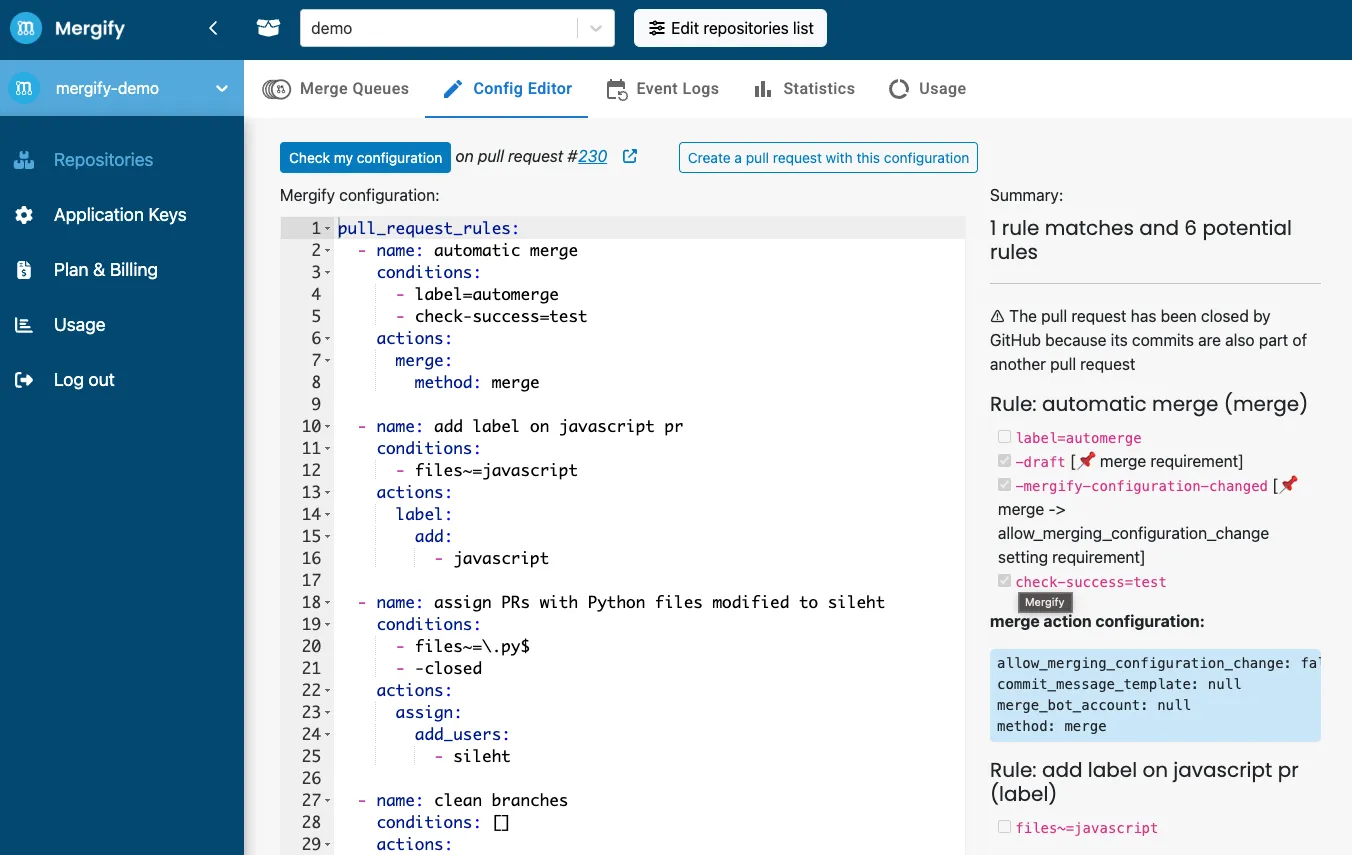
Section titled Use the Mergify Configuration EditorThe configuration editor evaluates your conditions against existing pull requests without triggering actions.
- Navigate to your Mergify dashboard.
- Select the repository you want to test.
- Click on the “Config Editor” tab.
Analyze the Mergify Checks
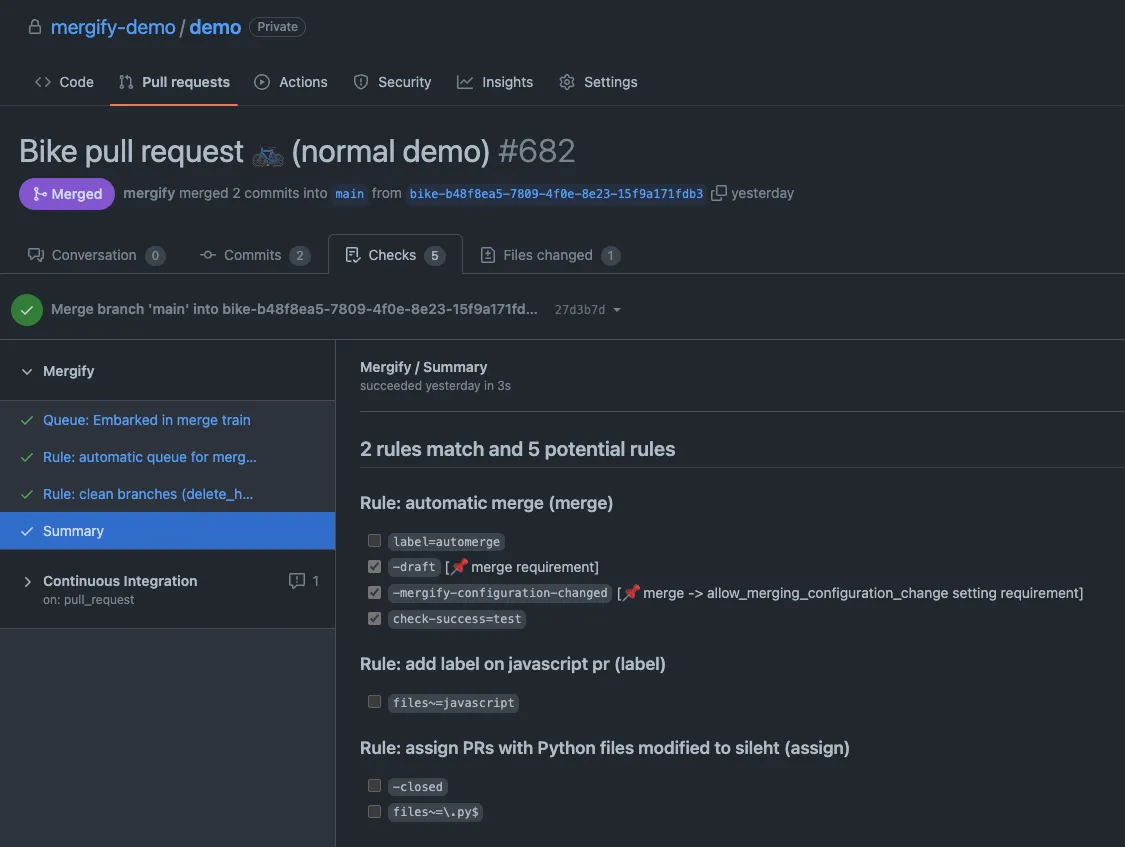
Section titled Analyze the Mergify ChecksOnce your configuration is committed, Mergify evaluates conditions for each pull request. To inspect the evaluation:
- Navigate to the “Checks” tab of the pull request.
- Look for the “Mergify” check in the list of checks.
- Click on “Summary” to view the detailed Mergify report.
The report shows which rules were evaluated and whether each condition was met.
Was this page helpful?
Thanks for your feedback!